Code Block Themes
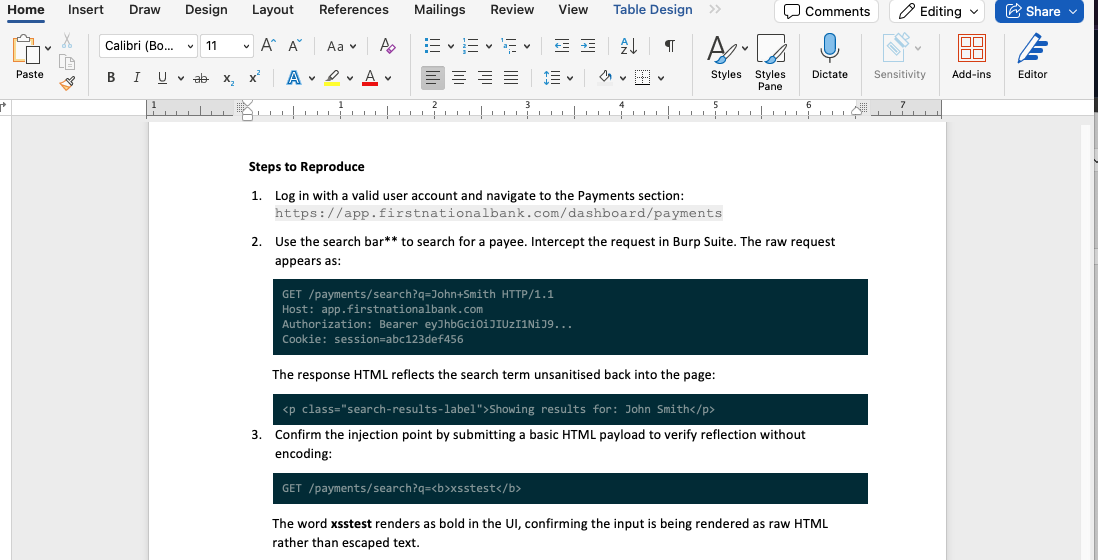
Code in a Faction report is a panel: a dark strip with the code in a monospace font and, if you asked for line numbers, a gutter down the left. You write one in any rich-text field with a fenced block:
Add start= to number the lines, beginning at whatever number you like — useful when you are quoting part of a longer file:
```start=400
POST /api/v1/user/profile/update HTTP/1.1
Host: app.firstnationalbank.com
Authorization: Bearer eyJhbGciOiJIUzI1NiJ9...
Content-Type: application/json

{
"firstName": "John",
"lastName": "Smith",
"email": "john.smith@email.com"
}
```
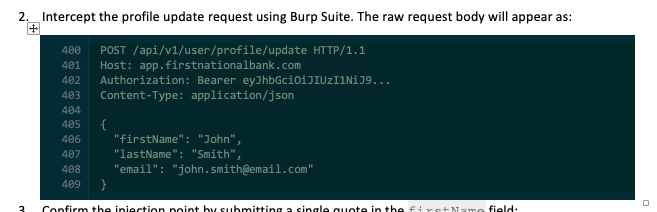
Out of the box the panel is themed Dracula. This page has ready-made CSS for a dozen other themes. Paste one into your template's CSS box and every code block in reports generated from that template takes those colors.
Where to paste it
Admin → Content & Reporting → Report Designer → select your template → CSS.
The CSS belongs to that one template, so different assessment types can carry different themes. Your CSS is added after Faction's own, so these rules simply win — you never need !important.
The editor keeps its own colors
This styles the report. The rich-text editor where you write the code block always shows the built-in Dracula panel, so a block will look different while you are editing it than it does in the generated document.
How a theme works
Every theme is the same two rules and four colors. There is nothing else to override.
| Slot | What it colors |
|---|---|
| Panel | The background behind the whole block |
| Code | The code text itself |
| Line numbers | The gutter digits, when you used start= |
| Divider | The hairline between the gutter and the code |
.code-block td {
  background-color: #282a36;  /* Panel */
  color: #f8f8f2;             /* Code  */
}

.code-block td.code-block-gutter {
  color: #6272a4;                    /* Line numbers */
  border-right: 1px solid #44475a;   /* Divider      */
}
Two details worth knowing if you write your own:
- Put the background on
td, not on the table. Word ignores a table's ownbackground-colorwhen the report is converted to DOCX, so a panel colored at the table level comes out unshaded in the downloaded document. - Keep
tdin front of the gutter selector. A bare.code-block-gutterloses to.code-block td, and your line numbers would come out in the code color.
The short padding rows at the top and bottom of the panel take the panel color on their own — you do not need a rule for them.
Dark themes
Dracula
The built-in theme. Purple-leaning charcoal, high contrast.
.code-block td { background-color: #282a36; color: #f8f8f2; }
.code-block td.code-block-gutter { color: #6272a4; border-right: 1px solid #44475a; }
Solarized Dark
Low-contrast blue-green, designed to be easy on the eyes over long stretches.
.code-block td { background-color: #002b36; color: #839496; }
.code-block td.code-block-gutter { color: #586e75; border-right: 1px solid #073642; }
If Solarized Dark reads too dim in print
Swap the code color for #93a1a1, Solarized's brighter base1. The palette intends base0 for body text, but a report is often read on paper or a projector rather than a tuned monitor.
Nord
Cool arctic blues, muted and even.
.code-block td { background-color: #2e3440; color: #d8dee9; }
.code-block td.code-block-gutter { color: #4c566a; border-right: 1px solid #434c5e; }
One Dark
Atom's default. Soft grey-blue, a gentler alternative to Dracula.
.code-block td { background-color: #282c34; color: #abb2bf; }
.code-block td.code-block-gutter { color: #5c6370; border-right: 1px solid #3e4451; }
Monokai
The classic warm-on-near-black, familiar from Sublime Text.
.code-block td { background-color: #272822; color: #f8f8f2; }
.code-block td.code-block-gutter { color: #75715e; border-right: 1px solid #49483e; }
Gruvbox Dark
Retro, warm and low-glare — brown-black panel with cream text.
.code-block td { background-color: #282828; color: #ebdbb2; }
.code-block td.code-block-gutter { color: #928374; border-right: 1px solid #504945; }
Tokyo Night
Deep indigo with cool text. Very dark panel, good for a report with a dark cover page.
.code-block td { background-color: #1a1b26; color: #a9b1d6; }
.code-block td.code-block-gutter { color: #565f89; border-right: 1px solid #414868; }
Night Owl
Navy rather than grey, tuned by its author for low-light reading.
.code-block td { background-color: #011627; color: #d6deeb; }
.code-block td.code-block-gutter { color: #637777; border-right: 1px solid #1d3b53; }
Catppuccin Mocha
Soft pastel text on a muted plum-grey panel.
.code-block td { background-color: #1e1e2e; color: #cdd6f4; }
.code-block td.code-block-gutter { color: #6c7086; border-right: 1px solid #313244; }
GitHub Dark
Matches GitHub's dark interface — a safe, familiar choice for a client-facing report.
.code-block td { background-color: #0d1117; color: #c9d1d9; }
.code-block td.code-block-gutter { color: #8b949e; border-right: 1px solid #30363d; }
Material Palenight
Indigo-tinted slate, softer than Dracula but similar in spirit.
.code-block td { background-color: #292d3e; color: #a6accd; }
.code-block td.code-block-gutter { color: #676e95; border-right: 1px solid #3a3f58; }
Zenburn
Low-contrast grey and sage. The quietest theme here — it never shouts on a page.
.code-block td { background-color: #3f3f3f; color: #dcdccc; }
.code-block td.code-block-gutter { color: #7f9f7f; border-right: 1px solid #545454; }
Everforest Dark
Green-grey and warm, easier on the eye than a pure black panel.
.code-block td { background-color: #2d353b; color: #d3c6aa; }
.code-block td.code-block-gutter { color: #859289; border-right: 1px solid #3d484d; }
Light themes
Worth considering if your report is printed. A dark panel across many pages uses a lot of toner, and some clients ask for light-only documents.
Solarized Light
The same palette as Solarized Dark, inverted. Warm paper-cream rather than white.
.code-block td { background-color: #fdf6e3; color: #657b83; }
.code-block td.code-block-gutter { color: #93a1a1; border-right: 1px solid #eee8d5; }
GitHub Light
Near-white with dark grey text — the most neutral choice, and the closest to ordinary body text.
.code-block td { background-color: #f6f8fa; color: #24292f; }
.code-block td.code-block-gutter { color: #6e7781; border-right: 1px solid #d0d7de; }
Gruvbox Light
Warm cream and dark brown. Easy to read in print without looking stark.
.code-block td { background-color: #fbf1c7; color: #3c3836; }
.code-block td.code-block-gutter { color: #928374; border-right: 1px solid #d5c4a1; }
Catppuccin Latte
Cool light grey with a soft blue cast — the light counterpart to Mocha above.
.code-block td { background-color: #eff1f5; color: #4c4f69; }
.code-block td.code-block-gutter { color: #9ca0b0; border-right: 1px solid #ccd0da; }
Atom One Light
Clean white panel, dark slate text.
.code-block td { background-color: #fafafa; color: #383a42; }
.code-block td.code-block-gutter { color: #9d9d9f; border-right: 1px solid #e5e5e6; }
Build your own
Fill the four slots with your own palette, most often your client's or your firm's brand colors:
.code-block td {
  background-color: #RRGGBB;  /* Panel: the darkest (or lightest) of your colors */
  color: #RRGGBB;             /* Code: high contrast against the panel            */
}

.code-block td.code-block-gutter {
  color: #RRGGBB;                    /* Line numbers: dimmer than the code        */
  border-right: 1px solid #RRGGBB;   /* Divider: a step between panel and numbers */
}
Three things make the difference between a theme that works and one that does not:
- Contrast between panel and code. Aim for a clear separation, and check it in the generated DOCX rather than only in the browser preview.
- Line numbers dimmer than the code. They are scaffolding, not content. If they compete with the code, every block looks busy.
- A divider close to the panel color. A step or two away is enough. A bright divider draws the eye down the page and away from the code.
Changing the font or size
Font and size are separate from color, and Faction sets both on the cells. Override them the same way:
.code-block, .code-block td {
  font-family: "JetBrains Mono", Consolas, "Courier New", monospace;
  font-size: 9pt;
}
Name the font on the cells too
A rule aimed only at .code-block loses to the stock template CSS, which sets td, th { font-family: Arial } — a font aimed at the cell beats one merely inherited from the table, and the code prints proportional. Naming both, as above, avoids it.
See also
- Using DOCX Report Templates — every
${variable}a template can use, report sections, severity colors and the rest of the CSS a template can carry. - User Defined Fields — add your own fields to findings and assessments and print them in the report.